
Feature-rich 3D viewer & Augmented Reality Plugin for WordPress Elementor Websites
PausAR Viewer Features & Demos
PausAR offers powerful, customizable options for the 3D viewer and AR experience (e.g. skybox background, dimensions, scroll & swivel effects, AR sound, fullscreen and more).
You are currently viewing a placeholder content from YouTube. To access the actual content, click the button below. Please note that doing so will share data with third-party providers.
More InformationComplex products are hard to sell online
Why PausAR?
Technical products lose impact in flat images. Your customers can’t feel the size, the detail, or the quality – and your sales team spends hours explaining what a good 3D & AR experience would show in seconds.
PausAR viewer turns your Elementor pages into innovative and interactive 3D & AR experiences. No developer, no external tools, no compromises – just your product, in full detail, in your customer’s hands.
Interactive 3D & AR – live on your website, in under 60 seconds
What you get
- True-to-scale AR – your product in your customer's real environment
- Plug & play Elementor integration – no coding required
- Automatic AR support detection for Apple & Android devices
- Extensive design options to match your brands CI
- Own hosting – no external iframes
Interactive display of 3D models directly on your WordPress website
3D viewer for Elementor
Present your products with animated 3D & AR viewers on your WordPress Elementor website. Interactive 3D & Augmented Reality directly integrated into your Elementor website content.
Customize 3D viewer appearance
- Show dimensions
- Customize Background (radius, color, gradient)
- Add background images or Skyboxes
- Adjust 3D viewer height
- Adjust shadow intensity
3D scene controls
- Configure the camera orientation
- Activate / deactivate 3D viewer rotation
- Enable / disable 3D model animation
Adjust "Start AR" button
- Style the "Start AR" button and add an icon
- In default the "Start AR" button automatically aligns to your websites style
- Show / hide "Start AR" button
Interactivity
- Zoom in 3D scene
- Toggle fullscreen mode (on/off)
- Mouse track swivel
- Mouse drag
- None (disables mouse drag)
Technical
- Integrate 3D viewer into any elementor section (e.g. container, nested elements, popups, product descriptions, ...)
- File format GLTF (.glb) - also used for android AR
Performance
- Generate a placeholder image to hide the 3D model loading time
- Disable the 3D viewer (only shows the Start AR button)
- Mode for optimized display for iframes (easier integration into other websites)
Realistic visualization of 3D models on WordPress websites
Augmented Reality & 3D viewer for Elementor

You are currently viewing a placeholder content from YouTube. To access the actual content, click the button below. Please note that doing so will share data with third-party providers.
More Information65% of consumers say 3D & AR increases their purchase confidence
– Shopify AR Study, 2022
More engagement. More confidence. More conversions.
Increase website interactivity with 3D and Augmented Reality (AR)
Realistic web Augmented Reality
Augmented Reality & 3D viewers trigger more emotions than texts, images or videos and transform a website visit into an interactive experience that remains in the memory of your customers and leads to conversions.
65% of consumers say 3D & AR increases their purchase confidence. – Shopify AR Study, 2022
Interactivitiy
- Interact with 3D model in AR (resize, rotate, replace)
- If desired, force a fixed, realistic size for your 3D models and disable scaling
Scene customization
- Play animation in AR
- Play sound in AR
- Activate call-to-action button for direct conversions from the AR view
- Default shows a camera button
- Take realistic product photos or videos in the AR view
AR support for 2.8+ billion devices
- Augmented reality without an app on smartphones and tablets (with ARKit or ARCore)
- iOS (since iPhone 6s)
- iPadOS (since 5th Gen)
- visionOS (Apple Vision Pro)
- Android (since Android v.7)
- Android XR (e.g. Samsung Galaxy XR)
Technical
- Choose between horizontal (default) or vertical surface detection
- Android: GLTF (.glb)
- Apple: USDZ or reality
Advanced Features
- Automatic generation of a QR code on PC
- Optional autostart for AR mode (after redirection via link or QR code)
- Automatic AR support detection and display of alternatives (e.g. browser change)
WordPress 3D viewer plugin with augmented reality for Elementor
Powerful 3D & AR Viewer Widget for Elementor
PausAR 3D & AR Viewer is powerful, easy to use, and requires zero programming knowledge – natively built for Elementor.
After installation, you’re ready to go immediately: simply drag & drop the PausAR Viewer widget onto your Elementor page, upload your GLB and USDZ models, hit save – done. Your website now features a full 3D viewer with built-in AR capabilities, all in one single Elementor widget. No second tool needed.
Trusted by 450+ WordPress Elementor websites worldwide.

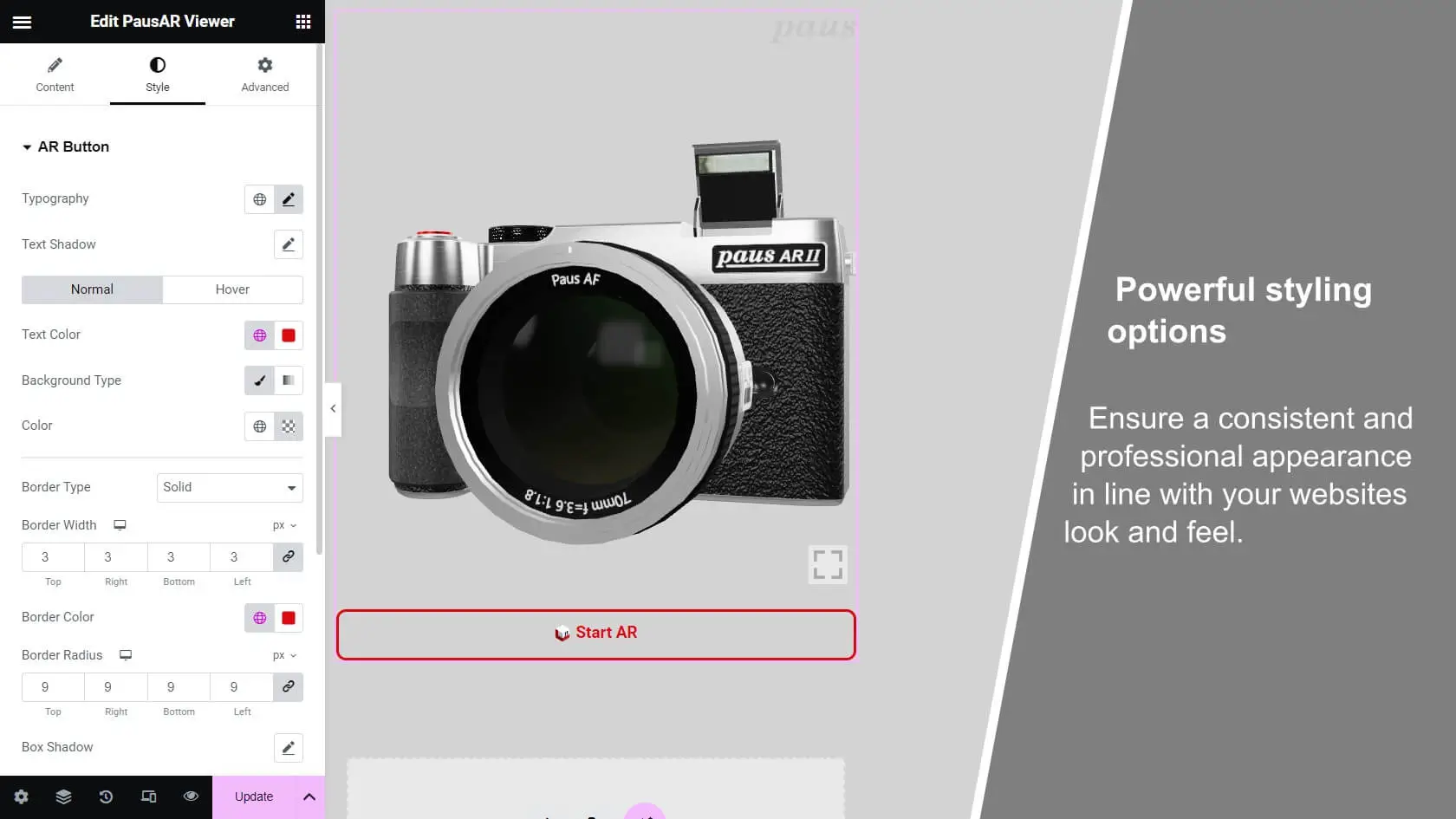

What you can do with PausAR 3D & AR Viewer for Elementor
PausAR Feature Demos
See what PausAR can do for your WordPress website and your business. The demos below showcase possible applications built entirely with the PausAR 3D & AR Viewer widget for Elementor: no custom development, no external tools, just drag, drop, and publish.
Whether you want to visualize industrial machinery, consumer products, furniture, artwork, historic buildings, or want to use 3D & AR for special occasions, PausAR gives you the flexibility to present any 3D model exactly the way you want – in an interactive 3D viewer and true-to-scale Augmented Reality.
Every feature you see here – AR sound, animated models, wall and floor placement, dimension display, skybox backgrounds, interactive configurators – is available directly within your WordPress Elementor page.
Your models stay on your own server, your branding stays intact, and your customers get an experience they won’t forget.
Background Color, Mouse Swivel, Zoom & Fullscreen
Feature-rich 3D viewer with Augmented Reality for WordPress
Customize your 3D viewer with a matching background color, let visitors interact via mouse swivel and zoom in the fullscreen model. Bring your product workflows to life in realisitc true-to-scale Augmented Reality.
Show dimensions, trigger animations, explore in real-size in AR
Present every product detail in 3D and Augmented Reality
Display true-to-scale 3D models of your products including animation in 3D and web AR. Show your products dimensions in the 3D viewer and let your customers rotate, explore, and place your product in their real environment, directly from your WordPress Elementor website.
You are currently viewing a placeholder content from YouTube. To access the actual content, click the button below. Please note that doing so will share data with third-party providers.
More InformationYou are currently viewing a placeholder content from YouTube. To access the actual content, click the button below. Please note that doing so will share data with third-party providers.
More InformationWall & Floor AR placement – both supported
Place any 3D object exactly where it belongs - on the wall or floor
PausAR supports both vertical and horizontal AR tracking, so your customers can place products precisely in their real environment – whether it’s a picture frame or Artwork on the wall, a machine on the factory floor, or furniture in a living room. No app needed.
Supports Elementor nested Elements
Simple WordPress 3D configurator with AR using Elementor
PausAR fully supports Elementor’s nested widgets – including accordions, carousels, and tabs – giving you complete control over where and how 3D viewers appear within your page content. Use Elementor tabs combined with PausAR viewer to build stunning interactive 3D configurators.
You are currently viewing a placeholder content from YouTube. To access the actual content, click the button below. Please note that doing so will share data with third-party providers.
More InformationYou are currently viewing a placeholder content from YouTube. To access the actual content, click the button below. Please note that doing so will share data with third-party providers.
More InformationDisable the 3D preview and launch AR from just a button
AR only – no 3D viewer, just one tap to Augmented Reality
Sometimes less is more. With PausAR you can disable the 3D viewer entirely and show only a clean AR launch button – perfect for product pages where you want a minimal footprint but maximum impact. One tap, and your product appears directly in the customer’s real environment.
Rotate on Scroll feature
Upgrade your WordPress website's user experience with 3D & AR
Showcase your products in 3D & AR on your WordPress website and elevate the customer experience with interactive 3D viewer features that catch user attention and increase website engagement.
Selected success stories with PausAR viewer
What Businesses achieve with PausAR viewer
From industrial product displays to art galleries and historical landmarks – PausAR viewer is used across industries to bring products and experiences to life in 3D and Augmented Reality. See how real businesses use PausAR to engage their customers, shorten sales cycles, and stand out from the competition. Discover more…
You are currently viewing a placeholder content from YouTube. To access the actual content, click the button below. Please note that doing so will share data with third-party providers.
More Information1:1 product presentation
Experience products like the Themendisplay (Theme Display) and the Ballständer eckig (Square ball stand) in 3D & AR.
You are currently viewing a placeholder content from YouTube. To access the actual content, click the button below. Please note that doing so will share data with third-party providers.
More InformationAR product usage sales presentation
POWER PACK
Experience the all in one: energy storage and charging station in Web Augmented Reality.
You are currently viewing a placeholder content from YouTube. To access the actual content, click the button below. Please note that doing so will share data with third-party providers.
More InformationVisualize artwork in their future space
Discover how ALLAB uses 3D & AR in their Online-Shop to let customers preview framed art prints in their own space.
You are currently viewing a placeholder content from YouTube. To access the actual content, click the button below. Please note that doing so will share data with third-party providers.
More InformationHistorical 3D scanned buildings come to life
A journey back in time: How Steinzeitpark Dithmarschen, Albersdorf uses AR to connect the past with the present.
Feature Comparison (Free vs Pro)
All features of PausAR 3D and AR for Elementor
Get access to the complete toolset for 3D & AR experiences on Elementor WordPress websites and remove all Paus branding with PausAR PRO.
PausAR features:
Lite (free)
Pro
Most asked questions about PausAR 3D & AR for WordPress with Elementor
FAQ

Can I use PausAR Viewer without the Elementor plugin?
Do I need Elementor Pro for PausAR Viewer?
No! PausAR Viewer works in the free version of the Elementor Page Builder. So it is possible to use PausAR Viewer without an Elementor Pro license and benefit from the advantages of Web Augmented Reality on your website. However, with the pro version of elementor you have the possibility to integrate Elementor templates on every page of your website via shortcode, which can be helpful if you use a theme that does not work with Elementor or have a store with WooCommerce and want to integrate PausAR Viewer with a shortcode instead of the “edit with Elementor” button. This can also be achieved without Elementor pro if you use the free plugin “AnyWhere Elementor” (you can find it on the plugin marketplace).
Does PausAR Viewer for Elementor work with WordPress Gutenberg?
Basically, PausAR Viewer for Elementor requires the Elementor Page Builder installed on your WordPress Website. However, you can save the content created with PausAR Viewer as Elementor templates and then integrate these into Gutenberg as shortcode. You can do this either with the Elementor pro plugin or the free plugin “AnyWhere Elementor” from the WordPress marketplace.
Can I use PausAR Viewer with my theme?
Yes, as long as your WordPress theme is Elementor compatible. If you can use Elementor in your theme, PausAR Viewer will also work! Otherwise, you always have the option of creating an Elementor Canvas page or template on which you can use the PausAR Viewer and include this content via shortcode or use the iframe mode to include the 3D & AR Content on your desired page.
Can PausAR Viewer be used in my WooCommerce Online-Shop?
Yes, as long as the elementor plugin is used on your online store in addition to the Woocommerce plugin, you can add PausAR Viewer to your product via the “Edit with elementor” button on your edit product page and display 3D & AR content in the product description.
If you prefer to place the 3D & AR model in the product short-description, you can do this by creating a template with elementor (needs elementors pro version or the free AnyWhere Elementor Plugin), integrating PausAR Viewer there and then simply inserting this template as a shortcode into the text field where you want to place it.
PausAR Viewer can also be used for product variants with in WooCommerce. However this is a little bit more complex. To do this, you first need to create a page with only PausAR Viewer and your required 3D / AR model. When everything is set, turn on the Iframe mode and then create a template in Elementor containing the HTML code from our documentation and integrate the created template with a shortcode into the variant description.
Where can I find Support for the PausAR WordPress plugin?
To get support please visit our Support page. We are happy to help you out!
PausAR Metrics: Analytics for PausAR 3D & AR Viewers
Understand Your PausAR 3D & AR Viewer Performance
See how visitors interact with your PausAR 3D models and Augmented Reality experiences – privacy-friendly, lightweight and perfectly integrated into your WordPress dashboard. Take data-driven decisions for your 3D & AR strategy.
